


🔧🚗 EL-50448 TPMS Activation Tool OEC-T5 – 50% OFF! Activate tire pressure sensors quickly – compatible with GM vehicles. 🔥💪
🔧🚗 EL-50448 TPMS Activation Tool OEC-T5 – 50% OFF! Activate tire pressure sensors quickly – compatible with GM vehicles. 🔥💪
Couldn't load pickup availability


| Minimum quantity | Discount |
|---|
EL-50448 TPMS Relearn Tool for Select GM Vehicles
Relearn the position of compatible tire-pressure sensors after a tire rotation, wheel change, or TPMS sensor replacement. This compact activation tool helps eligible vehicles register each wheel position through the vehicle’s built-in TPMS learn procedure.
A PRACTICAL TOOL FOR ROUTINE TPMS RELEARNING
- Activates compatible TPMS sensors during the relearn sequence
- Useful after tire rotations and certain wheel or sensor replacements
- Single-button operation with transmission and low-battery indicators
- Compact handheld design for home garages and automotive toolboxes
- Designed for select GM-family vehicles that support the EL-50448 procedure
SIMPLE ONE-BUTTON ACTIVATION
Once a compatible vehicle is placed in TPMS learn mode, hold the tool near the tire sidewall at the valve-stem position and press the activation button. The TX indicator shows when the tool is transmitting.
A separate low-battery indicator helps identify when the tool’s battery may need replacement.
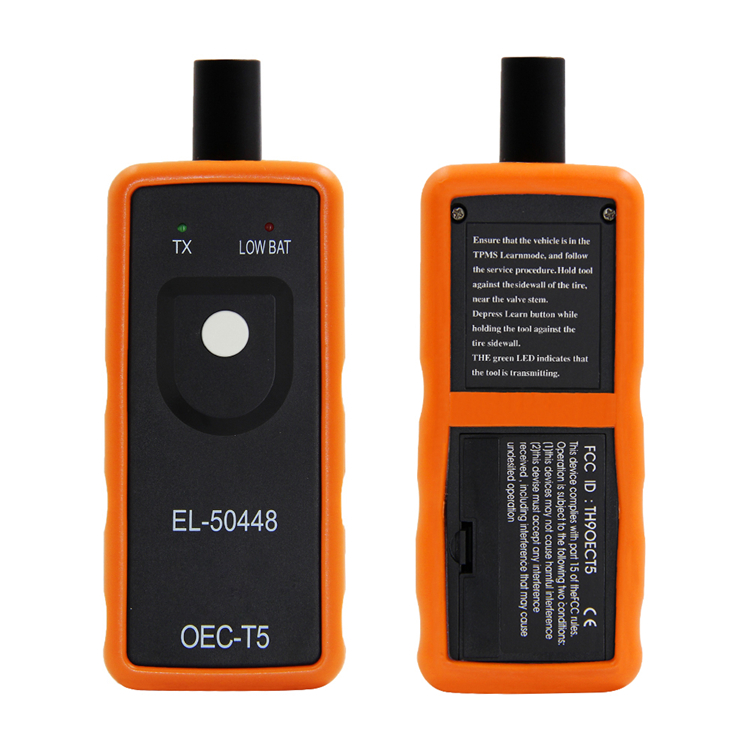
REPLACEABLE BATTERY COMPARTMENT
The rear compartment provides access to the replaceable battery, keeping the tool portable and ready for use without a charging cable.
Install the battery with the correct polarity and remove it before long-term storage. The battery is not included unless specifically stated with the selected product option.
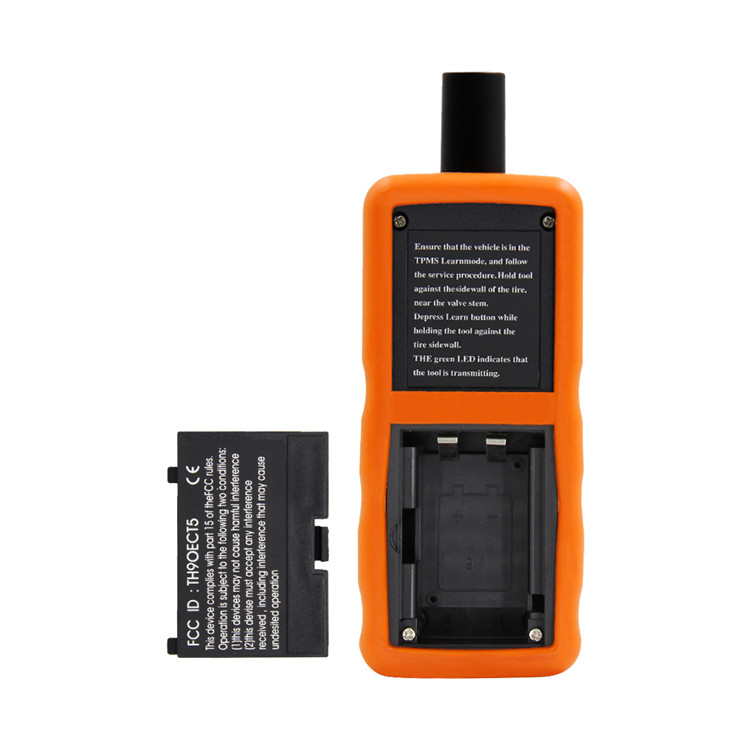
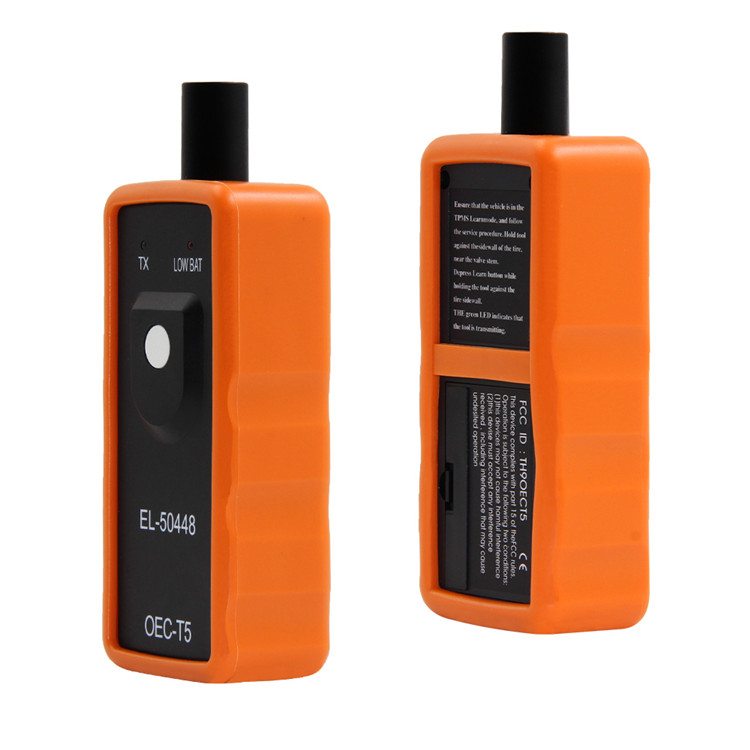
COMPACT FOR THE GARAGE OR GLOVE BOX
The protective orange housing is shaped for a secure handheld grip, while the raised antenna can be positioned close to the tire sidewall and valve stem during the sensor activation process.
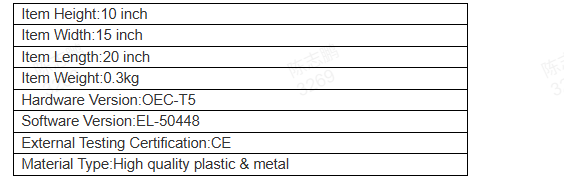
EL-50448 / OEC-T5 CONFIGURATION
This listing is for the EL-50448-style OEC-T5 activation tool. The housing is made from durable plastic with internal electronic and metal components.
Third-party specification graphics may contain inaccurate units or certification information. Always use the current product listing, received packaging, and vehicle service information as the final reference.
POSITION THE TOOL NEAR THE VALVE STEM
For the best chance of activation, place the antenna against or very close to the tire sidewall near the valve stem. Press and hold the button until the vehicle confirms that the sensor has been recognized.
Confirmation is commonly provided by a horn chirp, but the exact signal varies by vehicle. Follow the instructions in your owner’s or service manual.
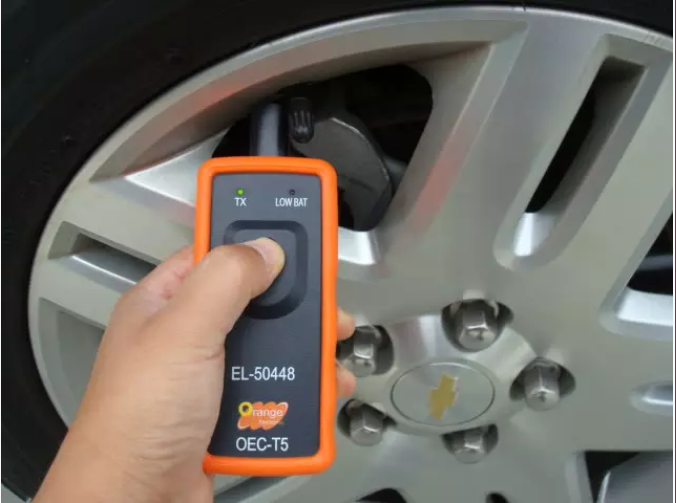
WORK THROUGH EACH WHEEL IN SEQUENCE
Many compatible vehicles use the following order: driver-side front, passenger-side front, passenger-side rear, and driver-side rear. Complete each wheel only after the vehicle acknowledges the previous sensor.
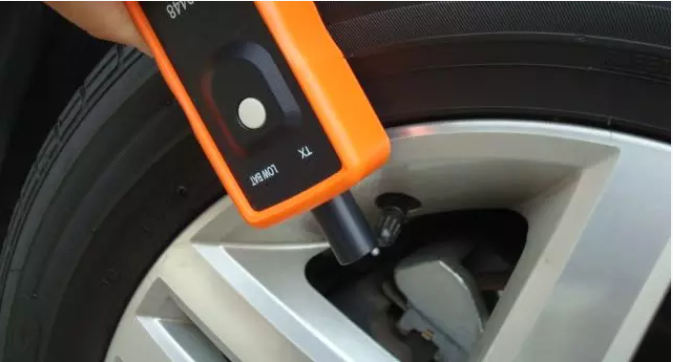
MADE FOR SENSOR POSITION RELEARNING
The tool helps activate compatible sensors while the vehicle is already in TPMS learn mode. It does not read tire pressure on its own, display sensor IDs, diagnose TPMS faults, clone sensors, or program incompatible aftermarket sensors.
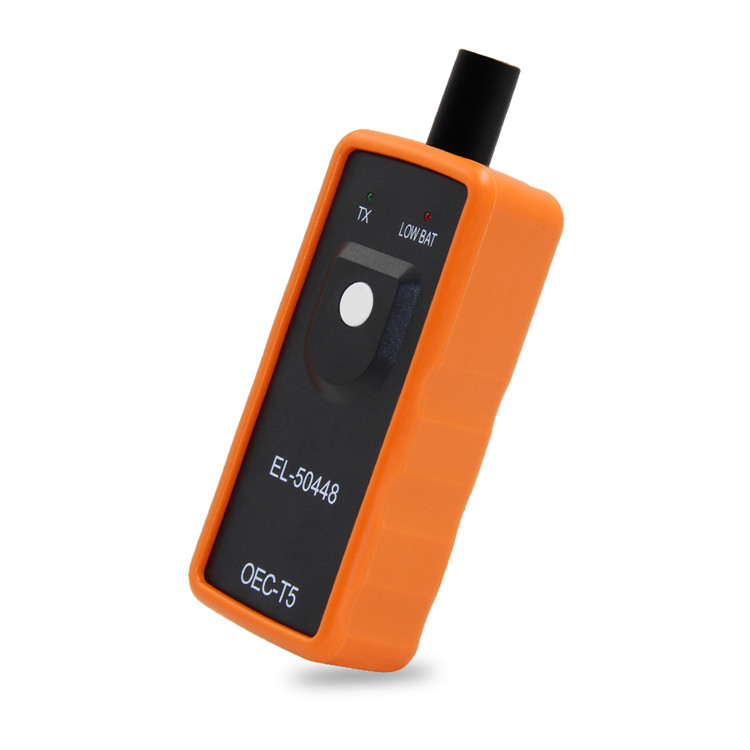
GENERAL RELEARN PROCEDURE
- Confirm that your exact vehicle and installed TPMS sensors support the EL-50448 relearn method.
- Park on a level surface, engage the parking brake, and place an automatic transmission in Park.
- Follow the vehicle owner’s or service manual to enter TPMS learn mode. Ignition and dashboard-control steps vary by model and year.
- Begin at the driver-side front wheel unless your vehicle specifies a different sequence.
- Hold the antenna close to the tire sidewall near the valve stem and press the activation button.
- Wait for the vehicle’s confirmation signal before moving to the next wheel.
- Continue with the passenger-side front, passenger-side rear, and driver-side rear wheels, unless the vehicle manual states otherwise.
- Wait for the final completion signal, exit learn mode, and verify the TPMS display according to the vehicle manual.
COMPATIBILITY CHECK
Compatibility depends on the vehicle model, model year, market, installed receiver, TPMS procedure, sensor frequency, and sensor type. The presence of a 315 MHz or 433 MHz sensor alone does not guarantee that this tool will work.
- The vehicle must support an EL-50448-style manual relearn procedure.
- The installed sensors must use the correct frequency for the vehicle.
- Some aftermarket, universal, cloned, or incorrectly programmed sensors may not respond.
- Some vehicles require a bidirectional scan tool or a different activation device.
- Always confirm compatibility using the vehicle owner’s manual, service information, or a qualified technician.
SPECIFICATIONS
| Model | EL-50448 / OEC-T5 style |
|---|---|
| Product Type | TPMS sensor activation and position-relearn tool |
| Operation | Single-button manual activation |
| Indicators | TX transmission indicator and low-battery indicator |
| Compatibility | Select GM-family vehicles with a supported TPMS relearn procedure |
| Sensor Frequencies | For compatible 315 MHz or 433 MHz TPMS systems, depending on vehicle configuration |
| Power | Replaceable battery required |
| Material | Plastic housing with electronic and metal components |
| Color | Orange and black |
PACKAGE INCLUDES
1 × EL-50448 TPMS Sensor Relearn Tool
Battery, sensors, diagnostic equipment, and vehicle service tools are not included unless specifically stated in the selected product option.
FREQUENTLY ASKED QUESTIONS
Does this tool display the tire pressure?
No. It activates compatible sensors during the vehicle’s relearn process. It is not a tire-pressure gauge or a diagnostic scan tool.
Will it work with every GM vehicle?
No. Compatibility varies by model, year, market, sensor frequency, and relearn procedure. Confirm compatibility before purchasing.
Can it program a brand-new universal TPMS sensor?
No. Universal or programmable sensors may first require a separate programming device. This tool is intended for activating compatible sensors during position relearning.
Why is the sensor not responding?
Common causes include an incorrect vehicle procedure, weak tool battery, incorrect sensor frequency, an incompatible sensor, a failed sensor battery, poor antenna positioning, or a vehicle that requires another diagnostic tool.
When might a relearn be needed?
Depending on the vehicle, relearning may be required after rotating tires, replacing a wheel or TPMS sensor, or servicing certain TPMS-related components.
IMPORTANT NOTES
- Verify exact vehicle and sensor compatibility before ordering.
- Follow the vehicle manufacturer’s relearn procedure rather than relying on a universal sequence.
- Do not use the tool while the vehicle is moving or while tire service is in progress.
- This tool does not replace a tire-pressure gauge, scan tool, or professional diagnosis.
- After relearning, verify actual tire pressures with an accurate gauge and inflate tires to the vehicle manufacturer’s specification.
- Store the tool in a dry location away from extreme heat, moisture, and direct sunlight.
- Remove the battery before extended storage and keep batteries away from children.
- GM, automotive brands, and related logos belong to their respective owners and are used only to describe potential compatibility. Alaskatag is not affiliated with or endorsed by these manufacturers.
BUY GENUINE ALASKATAG PRODUCTS
Beware of imitation Alaskatag products and unauthorized listings. Purchase only through the official Alaskatag store to ensure you receive the product represented on this page.
Contact Us
Contact Us
Questions, feedback or in need of more information?
Is your question not on one of our information pages or is something not entirely clear? Send an email to service@vipbugo.com. Please offer your name, contact phone number and the city you live. Please share product photos if you ask for after sales service.
Customer Service - Hours of operation:
Monday through Friday 9:00 AM to 5:00 PM
Saturday 10:00 AM to 6:00 PM
Sunday Closed.
Frequently Asked Questions:
Q: How long will it take to receive my package?
A: Please note that we require 3 to 7 days on average to fulfill your order before dispatching it. Rest-assured we are doing everything in our power to get your order to you as soon as possible! Once your order is dispatched, depending on your country or region, estimated delivery time is between 14 to 30 days. Please consider any holidays that might impact delivery times.
Q: What is the company return policy?
A: After receiving your return and inspecting the condition of your item, we will process your return or exchange. Please allow at least 14 days from the receipt of your item to process your return or exchange.
Q: How can I contact you regarding my order?
A: You can contact us via email at service@vipbugo.com or by using the form located on this page.
Return & Refund Policy
Return & Refund Policy
Thank you for shopping with us. We hope you're happy with your purchase. However, if for any reason you are not happy with your item, you may return it to us. Please review the policy below for more details.
RETURNS
To be eligible for a refund, items must be returned within 14 calendar days of purchase. Items must be in the same condition as received and free from any damage. (If an item is damaged during shipping, we may charge a 30%–70% fee depending on the severity of the damage.) Refunds are issued for the full purchase price, including shipping costs.
RETURN PROCESS
To initiate a return, please contact our customer support to obtain the Return Address. Once you receive the return instructions, please securely package the item in its original packaging and include your proof of purchase.
In some cases, return shipping may be free of charge. If the return is not due to an error by vipbugo.com, the return shipping cost will be deducted from your refund.
REFUNDS
Once we receive and inspect your returned item, we will process your refund or exchange. Please allow at least 14 days for processing starting from the date we receive your item. Depending on your credit card provider, it may take 1–2 billing cycles for the refund to appear on your statement. You will be notified by email once your return has been processed.
EXCEPTIONS
The following items cannot be returned or exchanged:
Perishable goods
Underwear
Gift cards
Custom products
Digital products
For defective or damaged items, please contact us using the information below to arrange a refund or replacement.
CUSTOMER SUPPORT
If you have any questions about our return policy, please contact our support center.
Orders can be canceled if the cancellation request is made before shipment and within the allowed cancellation period stated on the website.
There is no fixed time limit for cancellation as long as the order has not been shipped.
Once an order is placed, we typically process it within 2–3 days.
1. If the item arrives defective or damaged, we will cover the return shipping cost.
2. If you choose expedited shipping (for example, by voluntarily selecting a more expensive delivery method), the shipping fee is non-refundable.
3. To request a refund, please contact us. We will provide detailed instructions. Refunds will be processed within 3 business days after we receive and verify the returned item.
4. We will provide full return instructions upon request.
5. For refund processing, please reply via email with photos/videos of the package. Once approved, refunds will be issued within 3 business days.
6. If the item arrives damaged, we take full responsibility and offer free repair, replacement, or refund, including return shipping costs for defective items.
7. The return period is up to 30 days. For quality-related returns, we cover return shipping costs. For personal reasons, the customer is responsible for return shipping.
8. The following is our return address:
Country: China
Province: Guangdong Province
City: Dongguan City
Detailed Address: Xiaobaiju, 4th Floor, Building B, Kesuijingu Express Supply Chain, No. 1 Dongfeng West Road, Dali Village, Qingxi Town
Contact: Du Zuojun (Qyq)
Postal Code: 523648
Phone: +86 133 6066 3005
Shipping Costs: For non-quality-related returns, shipping costs are borne by the customer.
Refund Method: Refunds will be issued to your Klarna account via the original payment method.
Processing time: Approximately 7–14 business days in total (including processing time from both our team and Klarna).
Note: After the refund is issued, there may be a delay before it appears on your Klarna statement. This is normal and no action is required on your part.
Estimated Return Shipping Costs
Typical range: $15 – $60+
Costs vary depending on carrier, package size/weight, and shipping speed.
Key Notes:
Large or heavy parcels will cost more.
This estimate is for reference only. Final shipping costs are determined by the carrier.


